
You want to jump into a Solo blooket right now, but you don’t want to sign up, verify an email, or add another password to your list. Good news: you don’t have to. This guide covers exactly how to play Blooket without an account, what Guest mode actually gives you, what it locks you out of, and the specific moments when creating a free account is genuinely worth the two minutes it takes.
The Fast Answer
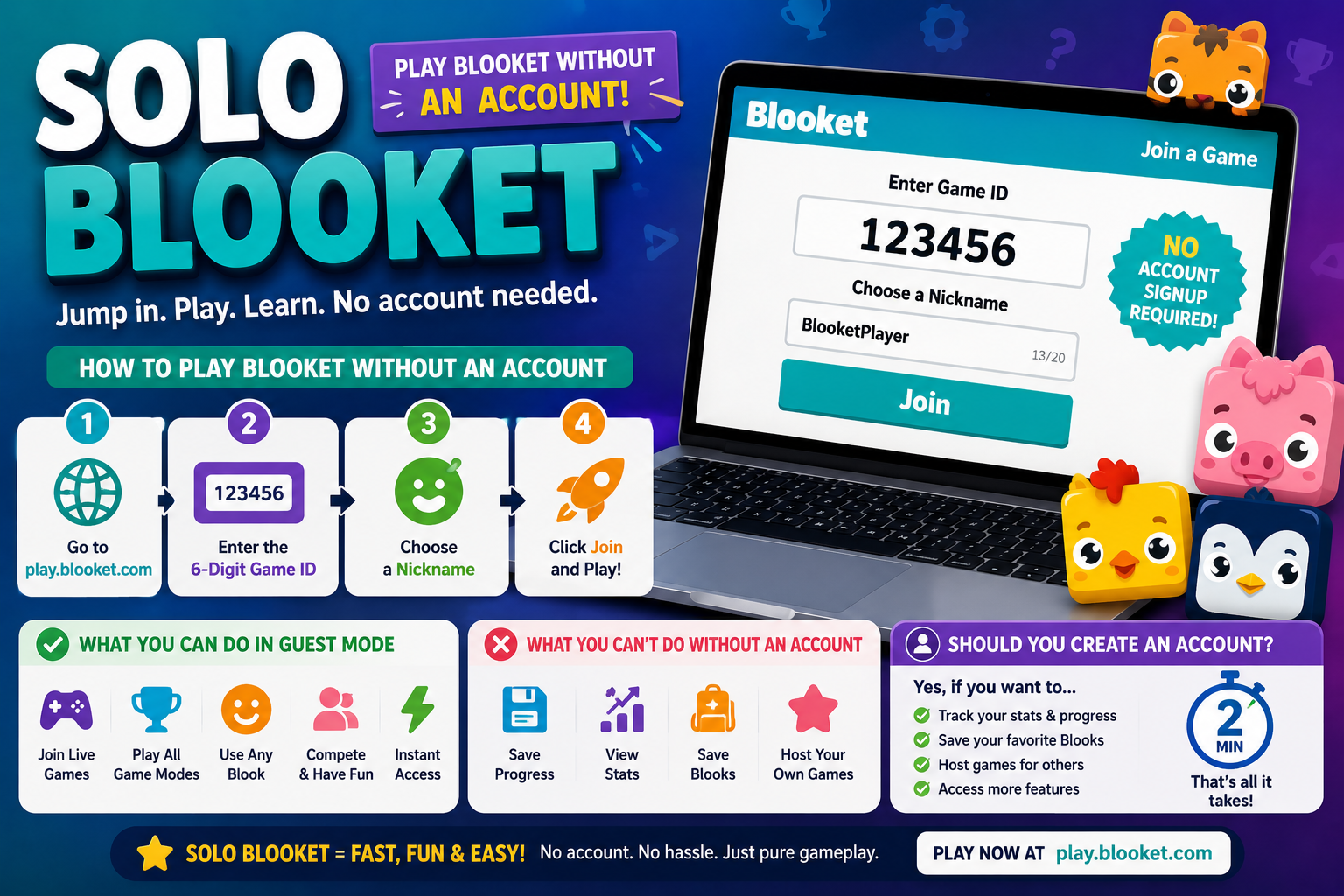
To play Blooket without an account:
- Go to play.blooket.com
- Enter the 6-digit Game ID from your teacher or host
- Pick a nickname
- Hit Join
That’s the entire flow for joining any live hosted game as a guest. No email, no password, no verification step standing between you and the lobby.
What Guest Mode Actually Gives You
Playing as a guest isn’t a stripped-down, second-class version of the experience — for joining a live hosted game specifically, it’s functionally identical to playing with an account. As a guest, you can:
- Join any live game a host is running, using just the Game ID
- Pick a nickname for that session
- Choose a Blook to play as, if the host’s settings include that step
- Fully participate in the live round, answering questions and competing on the leaderboard just like any logged-in player
For the specific purpose of “someone gave me a code and I want to play right now,” guest access covers everything you actually need.
What Guest Mode Doesn’t Give You
The limitations show up once the game ends or if you want to do more than join a single session:
- No saved progress. Your performance in that game isn’t tied to a persistent profile, so there’s nothing to look back on later.
- No personal Blook collection. Blooks you’d normally unlock and keep long-term through an account aren’t available to build as a guest — any Blook selection during a guest session doesn’t carry forward.
- No hosting ability. Guests can join games, but hosting a live game, creating question sets, or assigning homework all require being logged in.
- No access to Discover, Create, or the Market. These dashboard features are tied to an account, so a guest never sees them at all.
- No history or stats tracking. If you play multiple times as a guest, each session is disconnected from the last — there’s no cumulative record.
Essentially, Guest mode covers “join and play one live game” extremely well, and covers nothing beyond that.
Is There a Real “Solo” Mode Too?
It’s worth clarifying a related but different feature: Blooket also has a Solo mode, where a single player works through a question set independently rather than joining someone else’s live hosted game. This is a different use case from guest joining — Solo mode is typically accessed from an account’s dashboard (through Discover or a saved set) rather than through play.blooket.com’s join screen. If your goal is practicing a set by yourself outside of a live class session, that’s the feature to look for, and it generally does involve being logged in, since it’s tied to your own dashboard and question sets.
So the two no-login-required and login-required paths break down like this:
| Joining a Live Game (Guest) | Solo Mode | |
| Account needed? | No | Generally yes |
| Access point | play.blooket.com | Dashboard / Discover |
| Use case | Join someone else’s live hosted session | Practice a set independently |
When Is It Worth Creating an Account?
Guest access is genuinely enough for a large share of use cases — especially students joining a one-off classroom game. But a free account starts to matter once you want to:
- Host your own games for others to join
- Build a Blook collection that actually persists and grows over time
- Create or save your own question sets rather than relying only on sets others have made
- Track your own game history and performance across sessions
- Use Solo mode to practice sets independently, tied to your own dashboard
If none of that applies to you right now — you just have a code and want to play — there’s genuinely no reason to sign up. Guest access exists specifically so that joining doesn’t require any of that overhead.
How Long Does Account Creation Actually Take?
If you do decide it’s worth it, setting up a free Blooket account is a quick process: an email (or Google/Clever login), a password if going the email route, and you’re generally in your dashboard within a couple of minutes. It’s not a heavy commitment, which is part of why “wait until you actually need it” is a reasonable approach rather than signing up preemptively just in case.
Troubleshooting Guest Access
“It’s asking me to log in even though I just want to join a game.” Double-check you’re on play.blooket.com specifically, not the general blooket.com homepage, which is built around account features.
“My nickname or Blook choice didn’t carry over to a second game.” This is expected guest behavior — without an account, nothing persists between separate sessions, including your prior nickname or Blook pick.
“Can I upgrade a guest session to an account afterward?” Guest sessions aren’t tied to any saved data, so there’s nothing to “upgrade” retroactively. If you decide you want an account, you’d simply create one fresh going forward.
Frequently Asked Questions
Do I need an account to join a classroom Solo blooket? No. Students joining a live hosted game only need the Game ID — no account, email, or password required.
Can guests see the leaderboard and compete normally? Yes. Guest players fully participate in the live game, including appearing on the leaderboard, exactly the same as logged-in players.
Does Guest mode limit how many games I can join? No inherent limit exists specifically for guest joining — you can join as many separate live games as you’re given codes for, though again, nothing persists between them.
Is Solo mode the same as Guest mode? No. Guest mode is about joining someone else’s live game without an account. Solo mode is a separate feature for independently working through a set, generally requiring an account since it’s accessed through your dashboard.
Final Thoughts
If all you want to do is join a live Solo blooket, Guest mode is built exactly for that: no email, no password, no account overhead — just play.blooket.com, a code, and a nickname. The moment your goals shift toward hosting, building a Blook collection, or practicing sets independently through Solo mode, that’s when a free account actually starts to pay off. Until then, guest access covers the job completely.
READ MORE: Blooketplay
